Friday, June 8, 2012

On testing charges, sustain lifespan, universal laws and oil changes

Dear Coppell TV Repair,

I have a Zenith Z50PX2D.
I'm not sure which module is defective (symptoms are exactly as described on many sites!)
If I send you both modules (Y-sus and Z-sus), could you verify which one is defective, do the repair and return both back. (so I only have to pay for 1 repair) ?
Thanks,
Nick
We often get asked similar questions and although I've touched on the subject previously, I'll answer this one direct and forward similar questions to this post in the future.

There are several things I want to cover, but I'll start with the answer to the question asked: yes, you can always send both sustain boards and let us determine which one is bad and service only that one.

However, you'll have to pay us for testing the other sustain board is working good and that is often a waste of your money.

Here are the most important reasons why:


1. TESTING BOARDS MEANS SERVICE CHARGES

I guess to many that sounds like blood sucking banking fees, but here are a few simple reasons why testing translates to costs and therefore to charges:
 We bench test every single board that gets into our service facility and that bench testing helps discover apparent problems and thus save us the time and effort to put the board in a real set.

If all bench tests pass OK, though, we must put the board in a set as this is the final and ultimate test.

Sometimes they pass it and other times they do not.

So one, it takes time to make certain a board works good and that time needs to be paid.

As the enumerator in the above sentence suggests there's more to it than just time.

Sometimes the board turns out to be defective or may fail while testing. Rarely, but when you do hundreds of them per month rare changes its meaning.

Suffices to say it happens more often than we'd like.

So when it happens it can burn another board - whether because the one we're testing is malfunctioning or just failed; for example a malfunctioning Y-Main board may easily kill a buffer board and a failed sustain , either ZSUS or YSUS, can sometimes kill the power board.

Meaning two, there is a certain statistical risk in testing boards and that also means extra cost.

Last but not least, there is also a pure human factor risk in operating, which is different than time and different than statistical risk of coming across a failed board or a board that decides to fail on you.

We all do mistakes sometimes and the more we work with something the more likely it is to happen.

So three, there's the human error factor that needs to be shielded.

In summary, this is why we (and everyone with any brain) need to charge for a simple test of a working board.

2. THERE IS LITTLE VALUE / GREAT RISK IN KNOWING THAT CERTAIN MODULES ARE "NOW" WORKING


As I've pointed out many times before, some modules have particularly limited life span.

In our case, the Y-sustain and Z-Sustain boards in Zenith Z50PX2D fall in this category as all other modules in the TV easily outlast them.

If the two boards have similar life span (which is normal to assume since they use the same components to perform very similar functions on both sides of the plasma display panel) then it stands to reason that one should expect them to fail shortly after each other.

There are no two completely identical objects in the universe, though, and if there are they aren't being treated absolutely equally by the rest of the universe, so they can't be naturally expect to fail at the exact same time, or even by the exact same time difference.

So what's the value of knowing that one such board is "working" when the other isn't?

Not much really.

It can fail on the next day or the day after or a month later. Maybe a year later although if they have been rally side by side from day one I'd say it is much more likely to be within several months than within a year.

Don't forget we have to charge you for telling you that it works now.

So how would it feel if it fails three days from now?

Wouldn't that be wasted money?!

For the record, we're OK doing it either way, as long as the customer understands the risks involved.

In my experience very few do.

SOME SUSTAIN BOARDS HAVE SIMILAR LIFE SPAN AND OTHERS DO NOT
It is important to point out that while YSUS and ZSUS in all plasma TVs have very similar functions and often times similar implementation, it is not technically correct to assume that they necessarily have the same lifetime.

Sometimes the YSUS and the ZSUS are actually implemented differently and other times external factors may be causing the failure and it may only be affecting one of the boards. This is most commonly the case when a buffer board fails and causes damage in the YSUS.

Not all TVs have that problem either, so there's no golden rule that works in all cases other than "buy a new TV".

If your TV has those sustain boards:
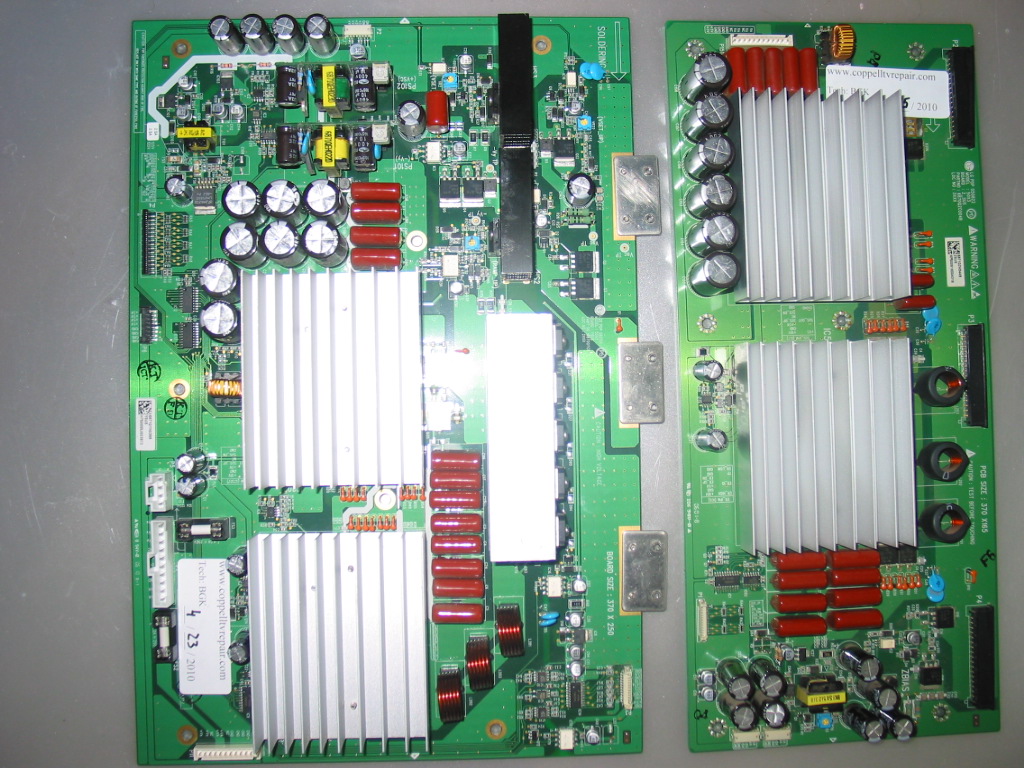
or this sustain board (too lazy to make picture of both, so just the Y-Main, sorry):
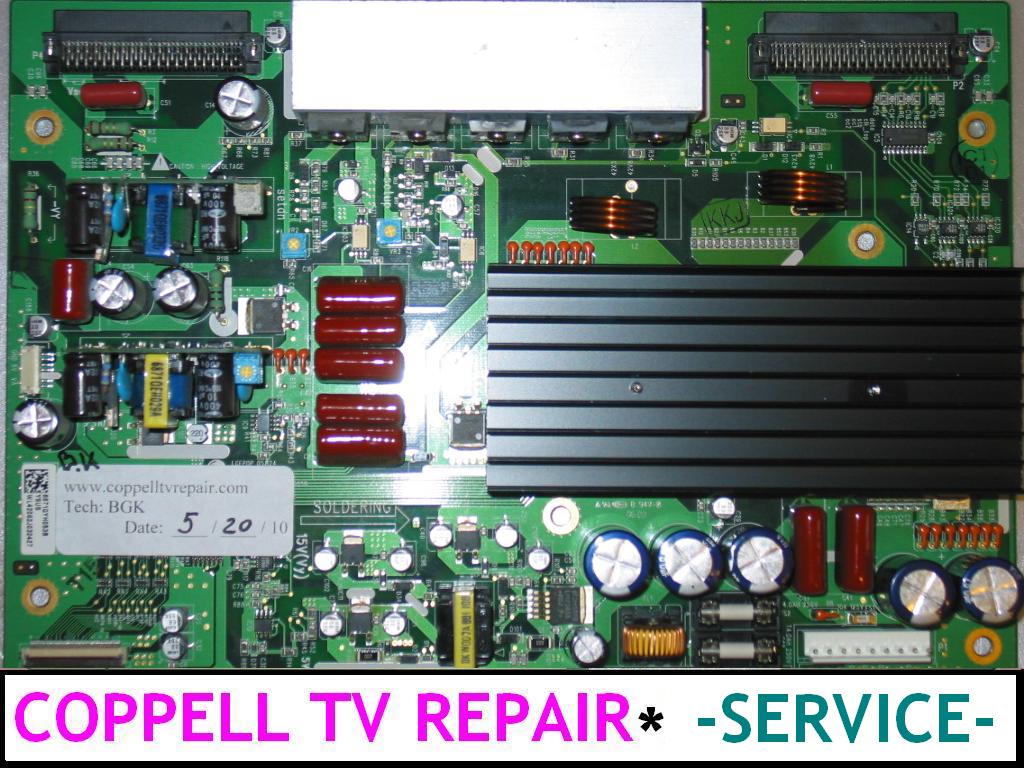
then the above considerations definitely apply to you as those tend to go bad in pairs.


ON HAVING FAILURE SYMPTOMS "EXACTLY AS DESCRIBED AT MANY SITES"


Hope that doesn't sound like picking on potential or current customer, but the Internet is so full of sh*t you'd be better off quoting it anyway.

People (including me) often assume that what they've experienced once or twice or three times represents general trend and formulate their experience as a general trend.

For example "the most common cause of the failure is the Y-Main board" [because my Y-Main has failed or because I've seen two, maybe three in a row where it failed].

Or "I opened my TV and didn't see any bulged caps on the power or sustain board". Well yeah, you won't because that's not what goes bad in your particular case even though Internet is full of people and cases where bulged capacitors were the problem.

To make things even better different failure syndromes (depending on how described) can be caused by completely different reasons.

A short on either YSUS or ZSUS board would cause the same automatic shutdown that can also be caused by a randomly failed power board or main board.

A failed YSUS board in one TV could result in completely different behavior from the one failed in another TV of the same model. Say on one they used Y-Main boards with IPMs from LG and in the other they used Y-Main boards with IPMs from Sanyo.

One would fail with a loud pop (maybe, most of the times anyway) and the other will go so quietly you may never actually notice it.

One may result in a dark screen, the other - in blinking.

It's the same failure (well almost), but two very different experiences and indications.

One can navigate through all of that on their own, of course....just as one can change their oil in the car, for example.

Most of the people - again including me - have their oil replaced by someone who's maybe not smarter, but definitely more efficient doing it.

Efficiency is a good thing.


Related: 
Should I replace one or both sustain boards in my plasma TV?
How to identify failed sustain board for HP PL4260N?

Wednesday, May 9, 2012

Vizio VA320M does not power on or has negative image after replacing main board

Recently I worked on a Vizio VA320M LCD unit, which, when turned on, would change the color on the front side "Vizio" sign from yellow to white and stop there.

There was no sound and no picture in the unit, but it would respond to power off command and switch back from white to yellow.

My first thought was that it was a problem on the inverter, but after a little research I found that it wasn't.

How can you know it's not the inverter?

Well it's simple: you can see the +5V line on the power connector and you can measure it to see if there are +5V there.

Then you can measure the "back light on" line (BL_ON) and see that there is no logical 1 there (namely anything above 2.5V).

You can take that a step further and short the two, i.e. pass +5V to the BL_ON signal on the power connector and see the back light come on and stay on.

So the problem was apparently in the main board.

In my case it turned out to be either BGA soldering on the main board's processing IC gone bad or, possibly, memory corruption which was blocking execution of the main startup program leaving the TV in a somewhat un-initialized state yet good enough to allow shutting it down.

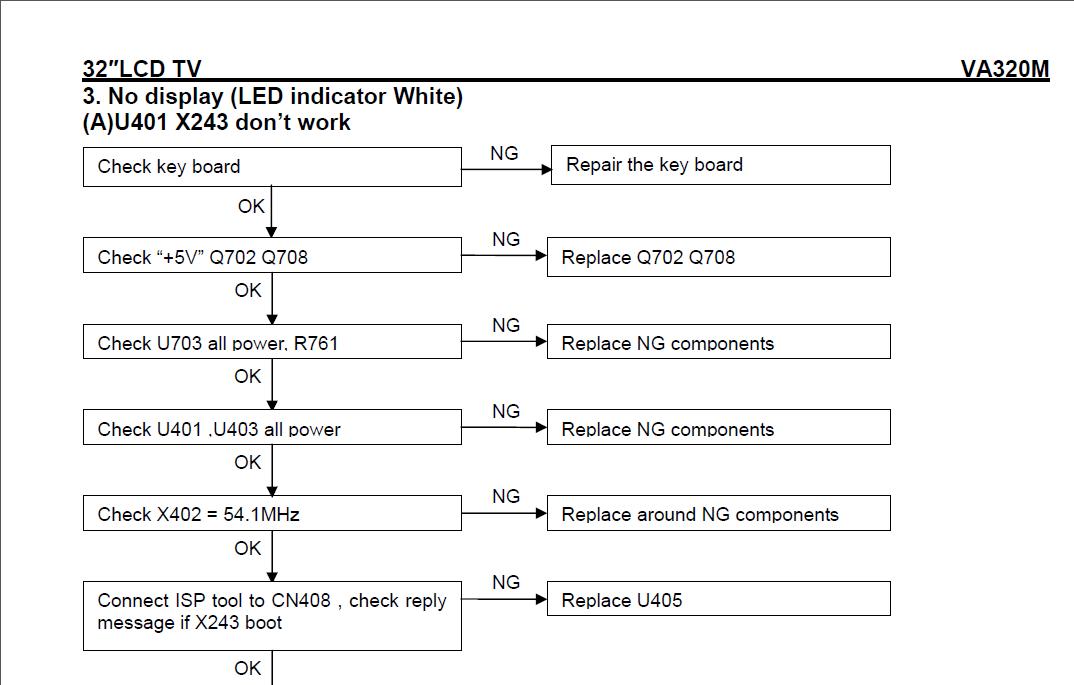
Below is the Vizio's troubleshooting guide for the situation:
It is clearly meant for absolute gurus and luckily that's what we are because we managed to properly diagnose and solve the problem even despite their help.

Anyhow, properly fixing the board required either BGA reworking or firmware flashing, i.e. service protocol reverse engineering and although a lot of fun, this also tends to be time consuming so we opted for leaving that for other high-end projects and just replacing the main board.

Here is the interesting part: Vizio VA320M comes , as often happens these days, in two different implementations: one is with an LG LCD panel and the other is with an AUO LCD panel and according T-Con board.

It's the same TV model, you can't tell the difference from the outside, but on the inside it uses two different display panels and different drivers for them.

Our main board was CBPFRD1KA1 and we couldn't find any store that was offering it, not at any meaningful price anyway.

So eventually we searched for "VA320M main board' and we found the following on SJ: "New Vizio CBPF9D1KZ2 Main Board for VA320M".

As listing clearly stated, this was from the TV version that had AUO LCD and the VA320M that we had was with the LG LCD...but what other chances we had? It was still faster (and cheaper) to get a working board than try to reverse-engineer the service protocol possibly after re-flowing the main IC on the board.

When the board arrived two days later we plugged it in out of curiosity and, not surprisingly, the TV came on...except it had some badly messed up colors.

Unfortunately I did not take a picture of it in time, but you hardly care that much anyway...you may already be seeing one after all :-)

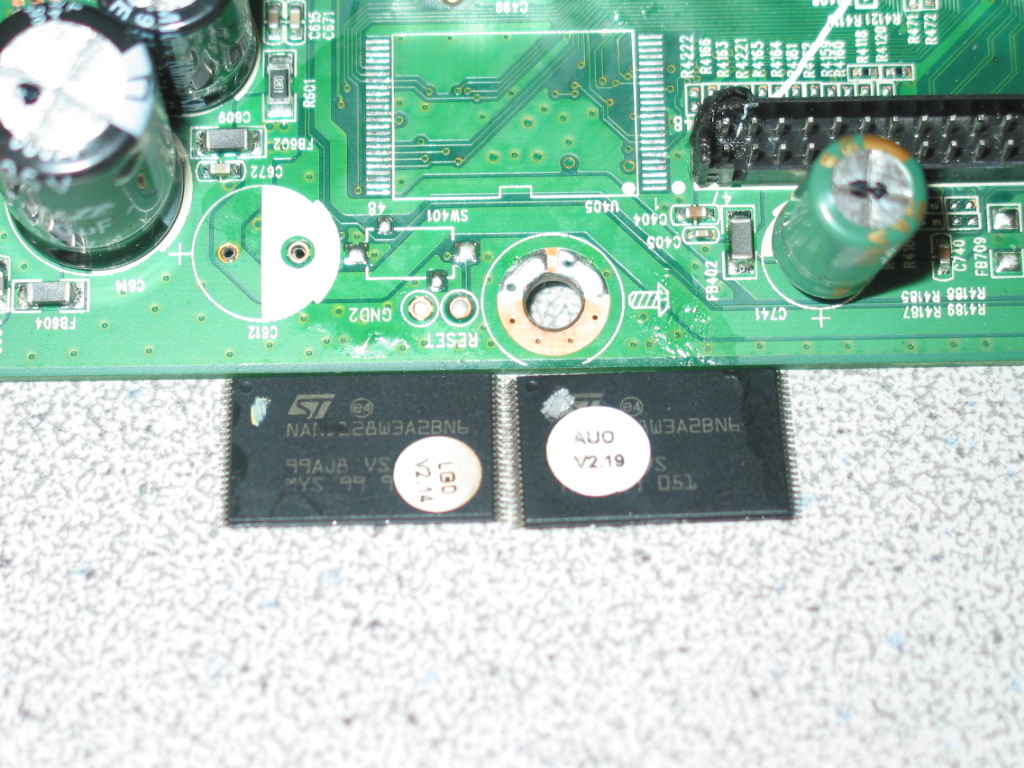
So what we ended up doing was replacing the LCD signal matrix encoding IC U405 on the working board with the one from the original LG board.

To make it easier for the operations we temporarily removed one nearby capacitor.

Here is a snapshot of the board with the two removed signal encoders (click to enlarge):

As you can see one of the ICs has an AUO label and the other has an LG label.

It was a precision job, but not nearly as difficult - or risky - as re-flowing the main IC on the faulty board.

And, of course, it worked flawlessly if you don't count the slightly melted LVDS connector :-)

Hope that helps!

Friday, April 27, 2012

LG 32LB4D / 32LC5DC-UA / 32LC7D does not turn on - power board EAY33058501/13 repair procedure

A major motel chain recently sent us a bunch of power boards EAY33058501/13 coming out of LG 32LB4D, LG 32LC5DC-UA or LG 32LC7D LCD TV models.

They had all worked in climate controlled indoor rooms and all had the same or similar issues - standby light coming on, but TV refunding to completely turn on or turning on for a short while or turning itself off shortly after coming on; sometimes the TV may come on, but without an image.

All power boards had the same set of capacitors visibly swollen at the top.

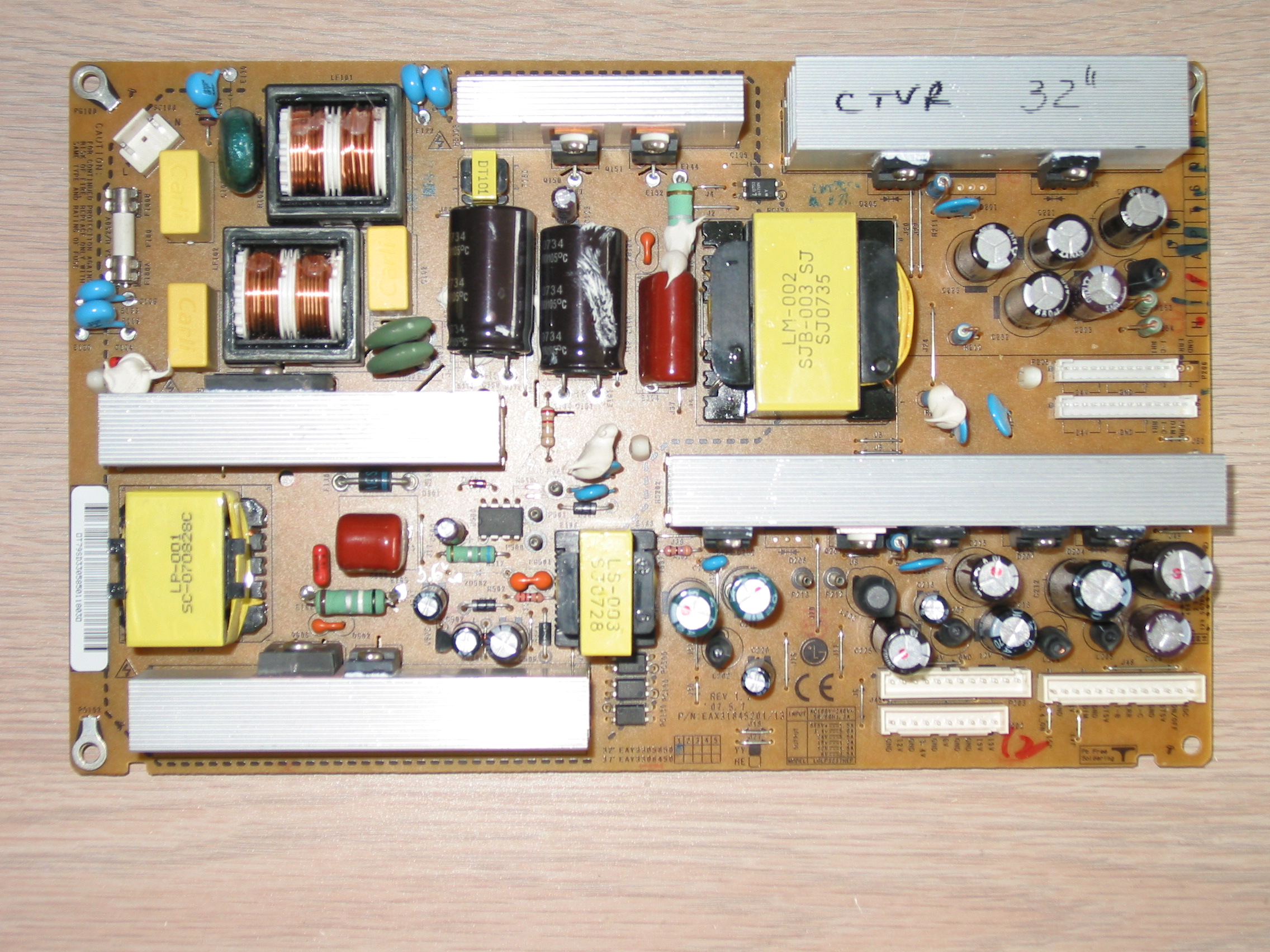
Below is the picture of the board:


The bad capacitors were C221, C222, C223, C232 (located below the upper right heat sink saying CTVR 32'' on the picture), also C203 in the same group, and C207 and C204, C205 located under the lower right heat sink.


When replacing the capacitors make sure to use same or better values for them, specifically same or better temperature rating and same or higher voltage!


Generic electrolytic capacitors found at RadioShack retail stores are usually of lower quality than the ones you need and I recommend against using them yet when nothing else is available they can be used as a temporary patch.


If you want the set of capacitors you can order it directly from here:


I've seen this power board also have other issues.
At least twice I've seen it being completely dead, usually as a result of a power surge that causes damage in a power component on the primary side, usually leading to a blown main fuse (next to the power plug). 

I can remember at least one case where the two power FETs Q150 and Q151 were blown and had to be replaced, possibly along with some smaller components around them too.


And there was at least another case where the +5V standby voltage would come on and the TV would respond to turn on command, but will shut itself off as a result of overvoltage in the mail power lines.


You should test the voltages that the board produces when it is activated. It is not hard to do.


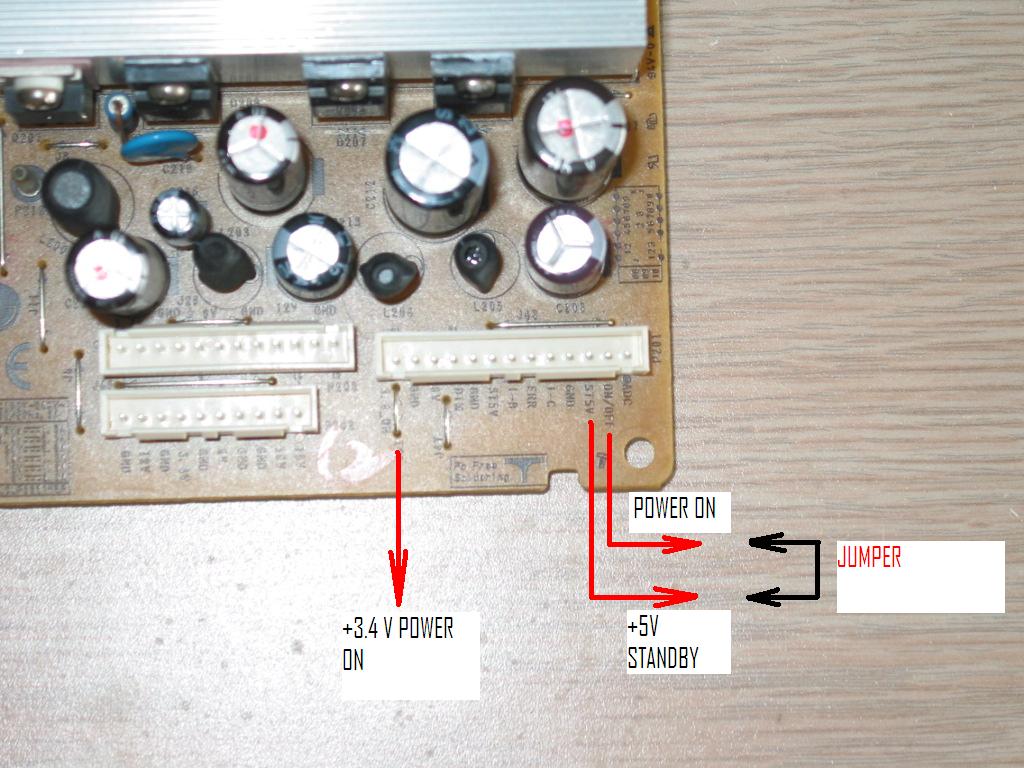
The connectors with power outputs for the main board are at the lower right corner of the board and look like this (click to enlarge):


You can see where the constant +5V standby output voltage is and right next to it is the pin that is used to tell the power board to turn on all other voltages, well, except a specific 3.4V output that is regulated separately.


To test the power board you can put it on a bench and manually short the POWER_ON and the +5V SB pins.


You can then measure the rest of the voltages as printed on the board, right by the connectors, including the 24V output at the P204 and P205 connectors not shown on this picture.


Note there are some control pins that do not produce output voltages; for example on P204 there are  4 pins at the right side labeled BRI, I-C, DIM and ERR. 


The same can be found on P201 and in fact the power board is simply being used to bridge the signal from one connector to the other.


Normally the output voltages are slightly *above* the declared values: 19V is 19.7V, 6V is 6.5V to 7V and 24V is closer to 25V.


This is OK as long as they are stable and within 5% to 10% of what's printed on the board.


When they are missing or significantly off or when the primary fuse is blown as mentioned above then the board has a more serious failure and needs to be serviced or replaced.

If interested in a repair service do not hesitate to contact us!

Sunday, April 8, 2012

How to import eBay / PayPal transactions in QuickBooks for free - part 1


Preface – please read all of it!
This article is for eBay sellers and everyone else using PayPal to receive payments for goods they sell and want to have those transactions imported into QuickBooks.
I assume some level of technical knowledge such as basic Excel and Access operations, PayPal navigation, ability to download files in different formats etc.
The information and files here are offered for free , but without any warranties other than that they were never designed to cause harm, harvest data etc. illegal activity.
Still, use everything below at your own risk and backup your files before you start experimenting!
Please realize that while I offer this at no cost I can not afford to support it at no cost!
If you have any questions or requests please use the Coppell TV Repair’s donations form to donate anywhere between $10 and $20 before submitting a question or I will simply ignore the request.
At the end of the preface , here’s a link to the files for download…but I honestly warn you it’ll be better if you read through the rest first:


Why was the PayPal-To-QuickBooks converter created?
I am an eBay seller receiving payments for goods and services via PayPal.
Sometimes I also make direct sales – again of either products or services – outside of eBay, but still receive payments through PayPal. (for the record, it’s not because I’m in love with PayPal; it’s because I prefer that everything related to one business is done in one place.)
For every payment I receive I use either eBay or PayPal to print a shipping label.
I also make purchases paying out of the PayPal account to various sellers.
It’s actually pretty straightforward – receiving money for sales, printing shipping labels, spending money on purchases and, I forgot, once a month transferring the money to a bank account so that I don’t lose too much should PayPal decide to kill me as some online rumors accuse it of doing.
And I want all those transactions to go into my QuickBooks accounting database for the company , which already holds the banking, credit card, salary etc. company accounting.
This would make my accountant happy to a point of not scalping me a few thousand dollars for having to do it by herself.

The problem
There are actually two problems with getting PayPal transactions into QuickBooks.
The first is the fact that PayPal records its transactions in a very weird, at least to me, manner. I suppose it makes great sense from their perspective and if I devote enough of my time to reverse engineer it (or , if that fails, RTFM) I could parse it and produce excellent QB file, but after looking it for 20 or so minutes I figured I better try another approach.
I know there is an app on the market that does it, but I didn’t want to both spend more money and then tie myself to yet another application. I wanted something simple, effective and below $20.
If you’re curious about PayPal’s data format just download a piece of history from your account’s transactions , then try to make sense of all those initiated, pending, open, partially refunded, temporarily held, reversed, cancelled etc. records they have.
Happily enough, they offer a download formatted “for QuickBooks” and if all you care is the amount of sales and expenses then it may actually work for you…for the most part.
On a side note I’ll also add that the transactions that PayPal returned to me in this way did not match the actual account performance, i.e. they are simplified, optimized and (I dare say) incorrect version of the complete transaction history offered by PayPal , the one that is so hard to process.
I only found that out later, of course, but I was expecting it and it was within reasonable margins. I definitely hope they improve it in the future at least in regards to accuracy.
The second problem is that the PayPal QuickBooks format, even if accurate, could not possibly fit nicely into QuickBooks unless your accounting needs are down to knowing how much was sold, how much was bought and at which dates.
If that’s all you want then you can stop reading here and just move on to downloading your history from PayPal in QuickBooks format and playing with it.
However, if you want certain frequent expenses such as subscriptions ending up in a “Subscriptions:Web Tracking” account in QuickBooks, or if you want to separate shipping label expenses from others, or if yo you want, like we wanted, to separate sales of services and products, or maybe separate certain groups of products from others, then you’re out of luck with the direct PayPal generated file for QuickBooks.
At the very best you’ll have to manually go through all transactions and reclassify them.
So, the second problem is the one of mapping of the transaction exported by PayPal.
At least I call it mapping; my account would call it “reclassifying” and you can call it whatever else you want. It is the problem of automatically assigning proper accounts, names and eventually descriptions to the transactions to be exported to QuickBooks so that you don’t have to manually change them one by one there.
For example, a simple eBay sales transaction is recorded this way in the PayPal’s QuickBooks output data file:
TRNS
1/31/2011
PayPal
YUQING LING
eBay Payment Received
31.65
YPPD-J017C YPPD-J018C YPPD-J018E 4921QP1050B


SPL
1/31/2011
Other Income
YUQING LING
-32.9


SPL
1/31/2011
Other Expenses
Fee
1.25


In QuickBooks, this will add one record to the account called “PayPal”, one to “Other Income” and one to “Other expense”.
What this transaction actually does is reflect a sale of something (what exactly will become clear later) for a total of $32.9, automatic withdrawal of $1.25 (for postage printed through PayPal) and resulting deposit of $31.65 in the PayPal account.
Well the mapping problem here is that I’d like the postage properly accounted for in a “Postage and delivery” account in QuickBooks and I want the income to not be “Other Income”, but “Product sales” or “Services sales” depending on what was sold.
And I do not want to correct that for all transactions I have.
I want a process that maps a transaction from the generic PayPal form to accounts and names used in my QuickBooks company.
If that’s what you want this article is for you.
Getting started
As mentioned above the problem of importing PayPal sales data into QuickBooks has two components and therefore you start by addressing the two of them: download data from PayPal and then creating maps that will define the translation of the generic PayPal transactions to customized accounts and names for your own QuickBooks company.
Before I walk you through those two steps, though, I’ll take a moment and talk for a second about the data processing being used.
Application requirements
I happened to have a copy of MS Office 2007 installed on the machine I was working on so this is the tool of choice for the task.
This includes Excel 2007 and Access 2007 and the downloadable solution includes two files – an Excel spreadsheet and a relational database in the specific format.
If you have an earlier Office version and the download doesn’t already include files for it then you’ll have to either take up on the challenge and convert them yourself or refer to the sixth paragraph of this article.

Downloading the data files
To download the files you’ll want to log-in to your PayPal account and download two separate files for the same period: the QuickBooks data file and the balance-affecting transactions file as shown on the below pictures.


The reason you’re downloading two and not one file is that for some reason the Quickbooks file does not usually include information on what a purchase or sale was for, at least as of beginning of 2012.
PayPal may start including this information in the future , but at least at the time being the easiest way to get it is from the historical transaction file.
At least in my case , perhaps because I was downloading data for a whole year at once, PayPal did not directly return the file, but told me that it’s being prepared and sent me an email within 24 hours advising me it is ready for download.
I will not walk you through this part and assume you’ve already successfully downloaded AllData.txt (TAB delimited, balance affecting) and AllData.iif (Quickbooks format).

(to be continued)

Saturday, March 31, 2012

eBay fraud: "SAMSUNG BRAND NEW UPPER AND LOWER BUFFER board LJ41-02760A & LJ41-02761A KIT"

The title of this article is purposefully made to match a particular listing on eBay.

I am sure it will eventually become invalid , so I am not going to post a link to it here, but I am going to post a picture of it while it's still active and explain why is it a fraud and from there, how many eBay listings in the "electronics>parts" category are fraud.

Here is the listing (click to see full screen):


This listing is definitely a fraud!

First, the specified buffer boards have been manufactured in 2006/2007 and because they go bad so often (as I've written before) at some point in 2010 pretty much all vendors here in USA exhausted all their availabilities. There was a period of time during which the boards could simply not be found and we, like some others, had to rely on repairing the original buffers.

Repairing the old buffers did not prove to be cost-effective (for reasons explained in the above referenced article) , but luckily Samsung has responded in a fast manner (for a company their size) and produced the new batch of buffer boards , which now have 4 buffer ICs (100 bits each) as opposed to the original ones that have 6 ICs with 64 bits.

Granted, this is a logical argument, not a proof that the boards listed here are old and used.

But wait, there's more!

All OEM buffer boards of this kind come with a revision model stamped on them.

The oldest ones are revision A1 and the latest ones (of the 6 - IC model) is A5; every TV sustain set we have seen here that has never been opened before (and we've seen easily hundreds) comes with buffers that have A1 to A5 on them.

Oddly enough, buffers sent to parts distributors come without revision label on them. I am talking about the ones that were in the distribution network before they got exhausted.

I don't know if that is on purpose or not, but again all the old style replacement buffers we have seen have never had revision label on them.

This, by itself, is still not a definite proof that the listing is a fraud, but you have to agree it adds up to the logical conclusion.

The final argument is probably the weakest one, but I'll present it anyway since it does have value to me.
As I've blogged before,  we are not new to importing from China.

My conclusion working with various electronic components vendors is that they are not so much committing fraud on purpose as they are simply not at all understanding what are they selling.

Perhaps someone in the supply chain there is clearly aware what they are doing , but it's usually not the dealer you communicate with; those dealers are often willing to learn and provide feedback back to the chain so that they do not lose your business.

How well does that work is another story.

But my point here is that based on experience I can easily guess that the seller doesn't even know that what they describe is, well, a nonsense. They probably offer it in good faith hoping to earn some valuable American dollars.

Looking at their other sales and the listing's description only adds to that theory; oh, and referencing the boards by their pure PCB IDs instead of the assembly ID (LJ92-XXX) or the marketing component ID (BN96-xxx) is yet another strong indicator that they have no clue what are they selling.

Bottom line?

Beware what you're buying...or you'll get what you deserve :-)

Wednesday, March 28, 2012

What to do before calling for tv repair?

Somehow someone landed at our site as a result of asking a searching engine this very question.

I did a google search myself and found this article. While generally agreeing with what it says I couldn't help but notice that I'd give rather different answer to the question, so I decided to post this article.

Here's what I'd suggest you do:

1) Unplug the TV from the AC power, hold on like that for 3-4 minutes, then try plugging it back again to see if it makes any difference.

2) Go behind the TV and look for the unit's manufacturing details label. What you need to find above everything else is the model of your TV.

It's an alpha-numerical combination usually following the word "MODEL" on the label and sometimes after it.

The make and the model of the TV are the two most important pieces of information that every repair technician should ask first when getting a new call.

The first two digits often (but not always) indicate the TV's display size, e.g. 42PC3D indicates a 42'' TV.
When first characters of the model are letters they often abbreviate popular things like the technology or particular series of the TVs made by this manufacturer. For example HP's PL5060N refers to PL[asma] 50 inch display.

3) Do a quick search on www.walmart.com, www.costco.com, www.frys.com, www.bestbuy.com and whatever other large store you may have nearby and like, to check how much would it cost to buy a brand new TV of the same display size.

In today's market TV prices have dropped so much compared to 3-4 years ago that many people don't realize they are being charged for service what it would cost to buy a new TV!

So before calling anyone, find out what's your practical target for repair expenses.

My personal rule of thumb is that no repair should cost more than half of what you can buy a new TV for.

Your mileage may vary.

4) Try to describe the problem you're having with one sentence , e.g. "sound but no picture" or "bad picture" or "cracked screen".
(if it's a cracked screen then don't even try to spend more time - it's pointless!)


5) Google for the TV model you've found out and your description, e.g. "HP Pl5060N sound but no picture"


Take 5 minutes of your time and see if others have hit the same problem and if it sounds like they have, then what solution did they find.


It's five minutes that can save you 5 days and a few hundred dollars, so take them!


However, be careful to avoid the trap of assuming that if someone else had the same problems that you have then your TV will absolutely have the same problem and the same solution!

If many people had the same problem and many people confirm that the same solution worked for them then you've likely found your problem and likely your solution.


All too often, however, people stop reading at the first description that sounds like theirs and assume they already know the problem.


That's wrong!


First because whatever you read may simply be another assumptions; Internet is full with well-meant people (as well as self-promoting people) who give free advices on anything, even if it is not correct.

So the fact that one person says your problem is caused by a bad power board does not automatically mean that you have a bad power board!


6) Before sending TV for repair (or before going to a service technician) try to research them.
Internet makes it very easy to find information on people and businesses.

Search for the business on both Google and Yahoo and see if there are reviews from local users for that business.

See if the business is present somewhere online (e.g. on Amazon, eBay or other prominent and independent website) and see what other users say for that business.


The more you know about who you're dealing with the easier you can transfer them ownership of the problem.


7) If all of the above sounds too complex just open your local Yellow Pages and call the first company advertising there.

You'll probably be paying at least twice on what you could otherwise do, but if that doesn't bother you you'll definitely save yourself time and effort.

Saturday, March 17, 2012

YPPD-J018E, YPPD-J018C, STK795-820, STK795-821 compatibility and credibility

From the mailbox:

QUESTION:
(posted under our listing advertising STK795-820 as an alternative to YPPD-J018C and YPPD-J018E)
 
Dear Coppell TV Repair,

How can you claim those chips will replace a YPPD-J018E and work properly ?

- mygoodiefinder
 
ANSWER:

Well, as far as claims go we can claim anything, which is pretty much how the market operates at this and probably any other point.

So, with all due respect, I think the question that you wanted to ass is
Do you know and how do you know if STK795-820 can substitute YPPD-J018E or YPPD-J018C?

Luckily that's an easy one to answer too.

Take your pick:
  1. Because we use them ourselves since 2009. A publicly available and independent proof of that claim can be found for example here , here and many other listings. (note: those links may not survive in a long run as eBay is getting harder and harder to please...but that's another story)

  2. Because we've sold hundreds of them to customers as can be seen here and people seem to be happy with them (a proof of which is the feedback ratio)

  3. Because we have seen original LG boards with the same number coming with any of the above listed components; as any manufacturer knows it is a common problem to run out of a particular component and to use a substitute until your main supply chain covers for the delay.

All in all those should be sufficient.

If I think of more I'll add them in the future.

Now, there are a few things worth mentioning here such as the fact that we mostly use STK795-820. Not YPPD-J018C and not STK795-821 even though the later is arguably a more recent and updated version of STK795-820.

Well it just so happens that we've had some bad experiences with a few batches of YPPD-J018C  and STK795-821 and ended up using STK795-820.

I've personally heard all kinds of stories from other repair shops - that STK795-820 generates too much heat; that instead it is the STK795-821 that produces too much heat; that YPPD-J018C are the better ones, being original LG part used in LG boards; that the STKs are Chinese fakes; that the J018C are Chinese fakes.

As I've said I've heard pretty much all.

My take is that other people have run on other bad batches and as sure can be said about anything in the world there are simply bad batches.
Especially if they come from China and that's what everything comes these days (milk or chicken , anyone?)

So we stick with what works for us and we'll continue sticking to it until something forces us to look again.

On that topic I want to remind the readers that newer is not necessarily better. Many times in machines and electronics newer versions are simply stripped down releases of the original, i.e. an extra circuit or component with secondary, often preventive or noise-suppressing function, is being removed as it is not essential to the functionality while stripping it down in tens of thousands of produced units has a distinct impact over the cost.

Unrelated to the current topic, but related to the question at the beginning: salesmen have always made and will continue to make all kind of completely stupid claims while pushing to attract more buyers or convert a viewer to a buyer.

One of my favorites is from all TV chop-shops (eBay and elsewhere) who claim that a sustain board has come from a TV with broken screen, but it was tested and guaranteed to work.

Suck a lame lie!